Asset Handling
Handling Assets with S3 & Cloud Flare
Handling assets & images used to always be one of my least favorite parts of building a web app. I believe a lot of that frustration was me overthinking things in my own head. I didn't fully understand best practices around image handling or how to best categorize, store and cache user generated images and the like. Everyone on Laracasts, Bluesky & Forums seems to handle this differently. Every video tutorial or blog post recommends a different approach. Some people store everything server side, some use S3 or R2. I've seen some threads of people swearing by Spatie Media Library as well. I personally wasn't sure where to start, so I decided I'd just figure it out on my own and build a custom solution tailored to my website's custom backend CMS.
The reason why I decided to dive into this is because my personal website (this one, like the one you are on right now!) has gone through countless iterations over the past 6 years now and it used to be strictly career focused. It used to only highlight my career, education, personal projects, development experience and achievements. However, I decided earlier this year to have this app pivot to be a representation of not only my career, but my hobbies, interests and travels outside of work too. In doing so, I had to learn and implement a way to best handle images and other assets.
Before I started though, I did watch this youtube video by LaravelOnline & this Larabit by Andrew and they were super helpful and highly recommend you check them out! While I didn't follow these entirely, I found them the most helpful when figuring out how I wanted to start.
So, before I could get started on this, I had to think about solutions for the following problems:
- Where will I house the assets?
- How will I store the asset database records?
- How will I render the assets themselves?
- How can I cache any image assets (this one came later)
First I decided to tackle where I would house the images. I've always been most familiar with AWS cloud and its suite of tools from my college days. I don't love AWS, but I am already using SES & EC2s & have a good grasp on IAM & User ACL, so I decided that I would use S3 to store all of my assets under different directories that were categorized based off of the type of asset being stored.
- Photos in /photos
- 3D prints in /3D_prints
- Resumes in /resumes
Next, I had to decide what I wanted as a user of my own platform for best handling assets & how I wanted to store these records at the database level. I decided that I wanted to abstract the concept of a "file" or "asset" as broadly as I could. I wanted the flexibility of adding new pages to this site in the future that may also require asset handling. So, I decided to make a pretty basic model called "Asset", that would store key information about the file at hand. This Asset table is only housing an Asset's name, slug, path and type (which is dictated by model constants, not DB Enums 😝). Any additional metadata like where a photo was taken, the version of a resume, or if an image has a description just get stored in a generic "data" json column. While this probably isn't the best approach for a large social networking app or image sharing site, I decided that because I am the only user here; I really don't need to audit every piece of metadata about an asset and decided to just focus on what I absolutely needed. You can check out the exact model here.
I then built out a pretty simple Livewire component & form for handling storing and deleting files. It also handles scaling images I took on my phone to fit a bit better using intervention. The form has a few simple helper functions for determining which directory the file should be stored in S3 based off of the type selected when uploading the file & what disk to use based off of the app's environment:
private function getStorageDirectory(): string
{
    return match ($this->type) {
        Asset::THREE_D_PRINTS => '3D_prints',
        default => 'photos',
    };
}

private function getStorageDisk(): string
{
    return app()->environment('production') ? 's3' : 'public';
}
And for accessing the path, of the image and storing it in an asset record, we can just store it like so:
$path = $this->photo->storePubliclyAs(
    $this->getStorageDirectory(),
    $this->generateFilename(),
    $this->getStorageDisk()
);
The asset is then created:
Asset::create([
    'type_id' => $this->type,
    'name' => $this->name,
    'slug' => Str::uuid(),
    'path' => $path,
    'mime_type' => $this->photo->getClientOriginalExtension(),
    'data' => [
        'captured_at' => $this->capturedAt,
        'description' => $this->description,
        ...
    ],
]);
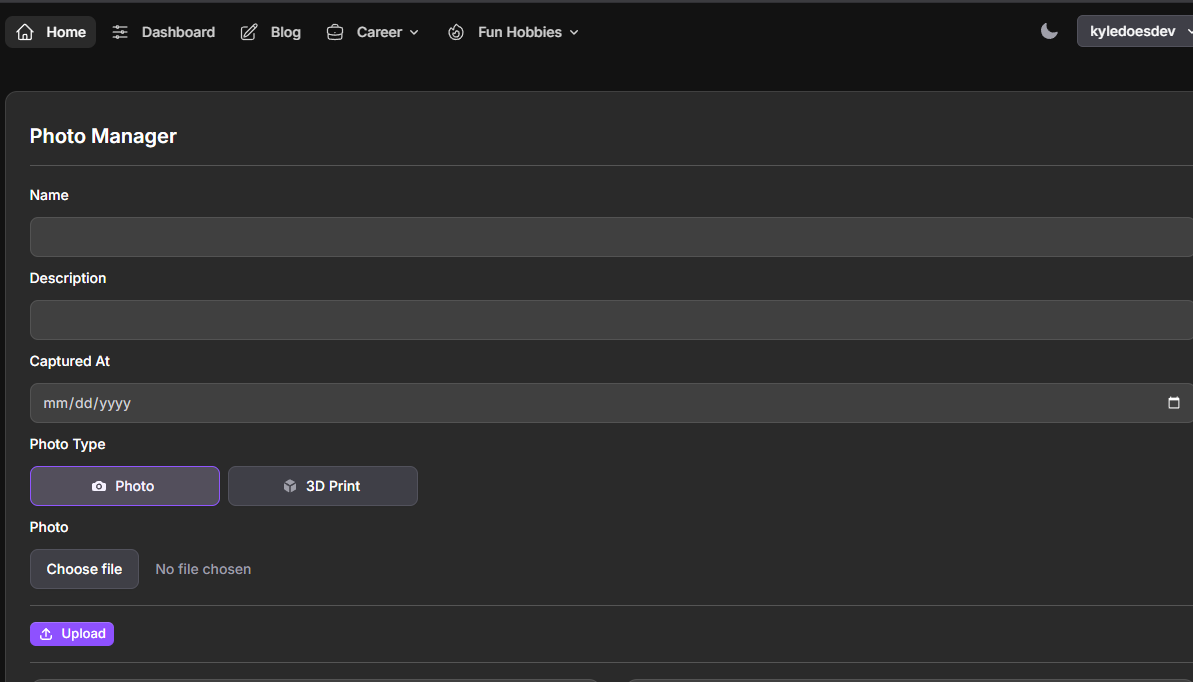
I then had to figure out how I wanted to handle rendering these photos in the UI. I knew that I did not want to make my bucket name available within the URL, so I built a wrapping invokable controller to query the asset based off of the slug provided to the endpoint. I think it turned out incredibly clean and is one of the pieces I am the most happy with in the process:
//Laravel route
Route::get('/asset/{slug}', AssetController::class)->name('asset');


//Controller

<?php

namespace App\Http\Controllers;

use App\Models\Asset;
use Illuminate\Http\Request;
use Illuminate\Support\Facades\Storage;

class AssetController extends Controller
{
    public function __invoke(Request $request, string $slug)
    {
        return Storage::disk('s3')
            ->response(Asset::where('slug', $slug)->firstOrFail()->path, null, [
                'Cache-Control' => 'public, max-age=31536000',
            ]);
    }
}
They are then rendered out in the following way from my "Gallery" Livewire component:
@forelse($this->photos as $photo)
    <flux:card>
        <div class="flex flex-col items-center">
            <img
                src="{{ route('asset', ['slug' => $photo->slug]) }}"
                alt="{{ $photo->name }}"
                style="width: auto; height: auto; max-width: 100%;"
                ...
            >

            ...
    </flux:card>
@empty
    ...
@endforelse
And this worked out perfectly! My images, based off of the type given to the Gallery component would render out every photo by hitting the asset route to grab the file from S3!
I then actually walked away from this for a while. I was pretty happy with how it was working, and didn't see a need to change it. I then came back to it a bit later and was unhappy with how on every page load, queries would fire off, and S3 would have to be tapped to grab the photos, so I wanted to learn more about how I could cache the images in the user's browser or with a CDN somehow. I knew that this was probably a bit overkill for this website, but it was something I decided I would try to learn nonetheless. I watched Aaron Francis' video on image manipulation with CloudFlare. This wasn't exactly what I was looking for (you should still go watch it though), but I learned that CloudFlare could be used for image caching. To be entirely honest with you, I always knew that CloudFlare existed, but never really knew what it did, what it was capable of, or why it was so cool. I generally would confuse CloudFlare with CloudFront ... Lol.
So, I actually worked with Claude Sonnet 4.0 in addition to CloudFlare's docs to ask for more specific instructions on how to seamlessly set this up. And it was super helpful. I went from not having a CloudFlare account to being all set up with my images being cached in about an hour.
These were the steps I took to get this going:
First there were some Laravel changes I had to make:
- I added cache headers to my asset controller response as the third parameter.
- I Set cache duration to 1 year (max-age=31536000)
I then signed up with CloudFlare, changed my domain's DNSSEC Configuration to be managed by CloudFlare (all of my domains are in squarespace, RIP google domains)
I then did the following:
- I Navigated to Rules → Page Rules
- Then I created a new page rule for my asset URL patterns
- I set cache level to "Cache Everything"
- I Set Edge Cache TTL to 1 month
- I Set Browser Cache TTL to 1 month
- I finally saved and activate the rules
Just like that, my images began getting cached by CloudFlare!
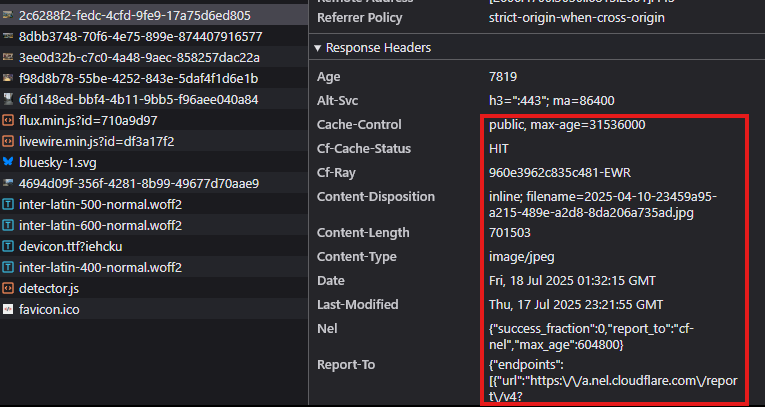
This may not be the approach you might take to do something like this, but this is how it worked out for me. I do have some other ideas for features to add (catalog images based off of trips I take maybe) but I am going to save those for later. I hope this helped you in some way. If not that is okay too! Please feel free to reach out to me via bluesky if you had any other questions or comments about this! Feel free to check out the entire source of this my website as well if you wanted to dig into any other functionality I may have passed over!